Detail Panel
Clicking a Glossary's row in the list shows the Overview (detail) panel.
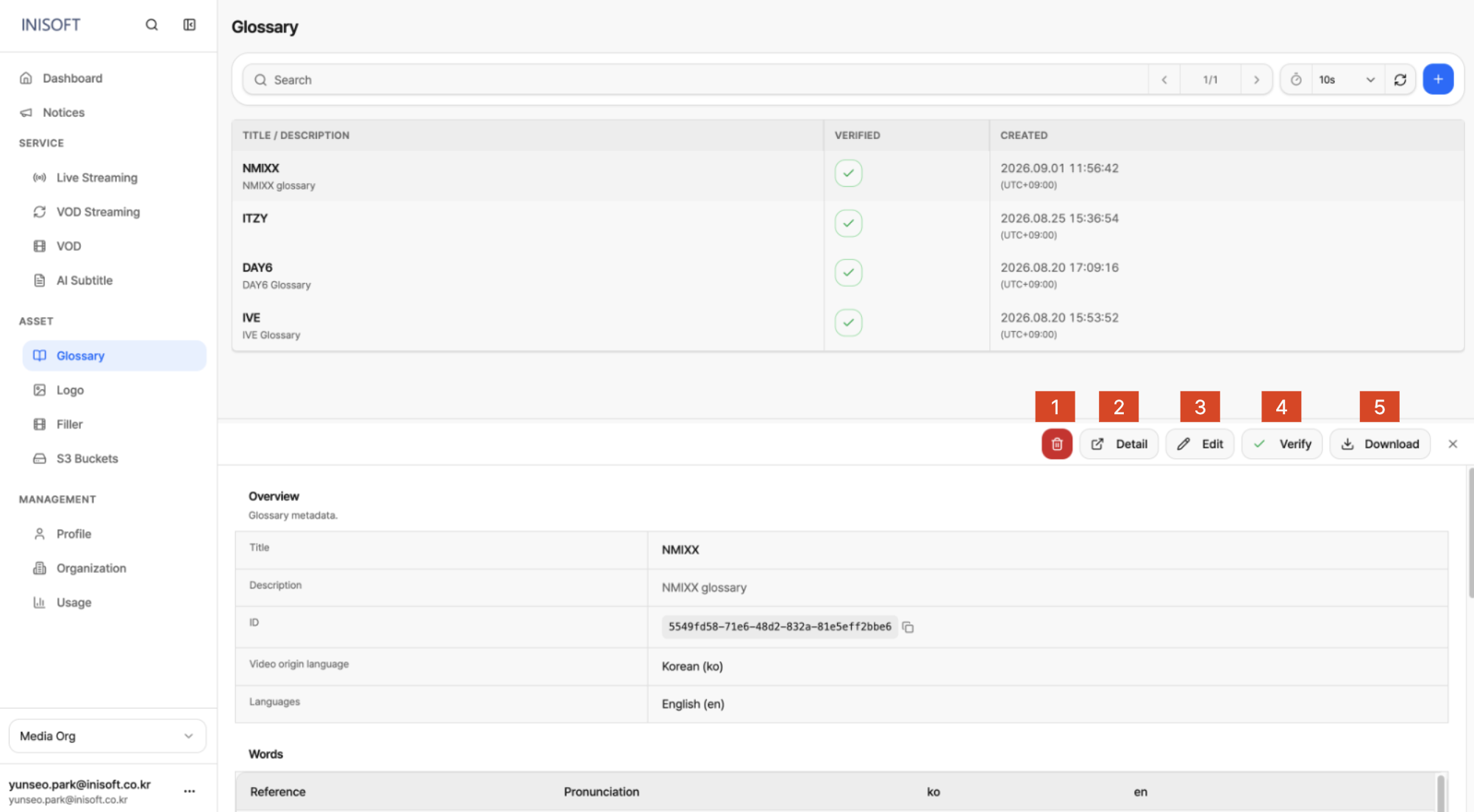
Fig. Glossary Detail panel
What the Detail Panel Offers
The detail panel lets you check the Glossary's basic information and registered Words list, and take you to the full-screen detail page. It also lets you verify or download the registered terms, and edit or delete the Glossary's settings.
| NO | Button | Description |
|---|---|---|
| 1 | Delete | Deletes the selected Glossary. |
| 2 | Detail | Takes you to the full-screen detail page for the Glossary. |
| 3 | Edit | Takes you to the screen for editing the Glossary's content (Title, Description, languages, Words). |
| 4 | Verify | Verifies the registered content and switches the Glossary to Verified status. |
| 5 | Download | Downloads the registered Words list as a file. |
Opening the panel expands the Glossary's Overview (Title, Description, ID, Video origin language, Languages) and Words list right below the buttons, so you can check content equivalent to the detail page without leaving the list.