List Screen
Entering the VOD Streaming menu shows the full list of registered streaming events. You can use the search feature to quickly find a specific event, and the auto-refresh feature keeps the event list periodically updated.
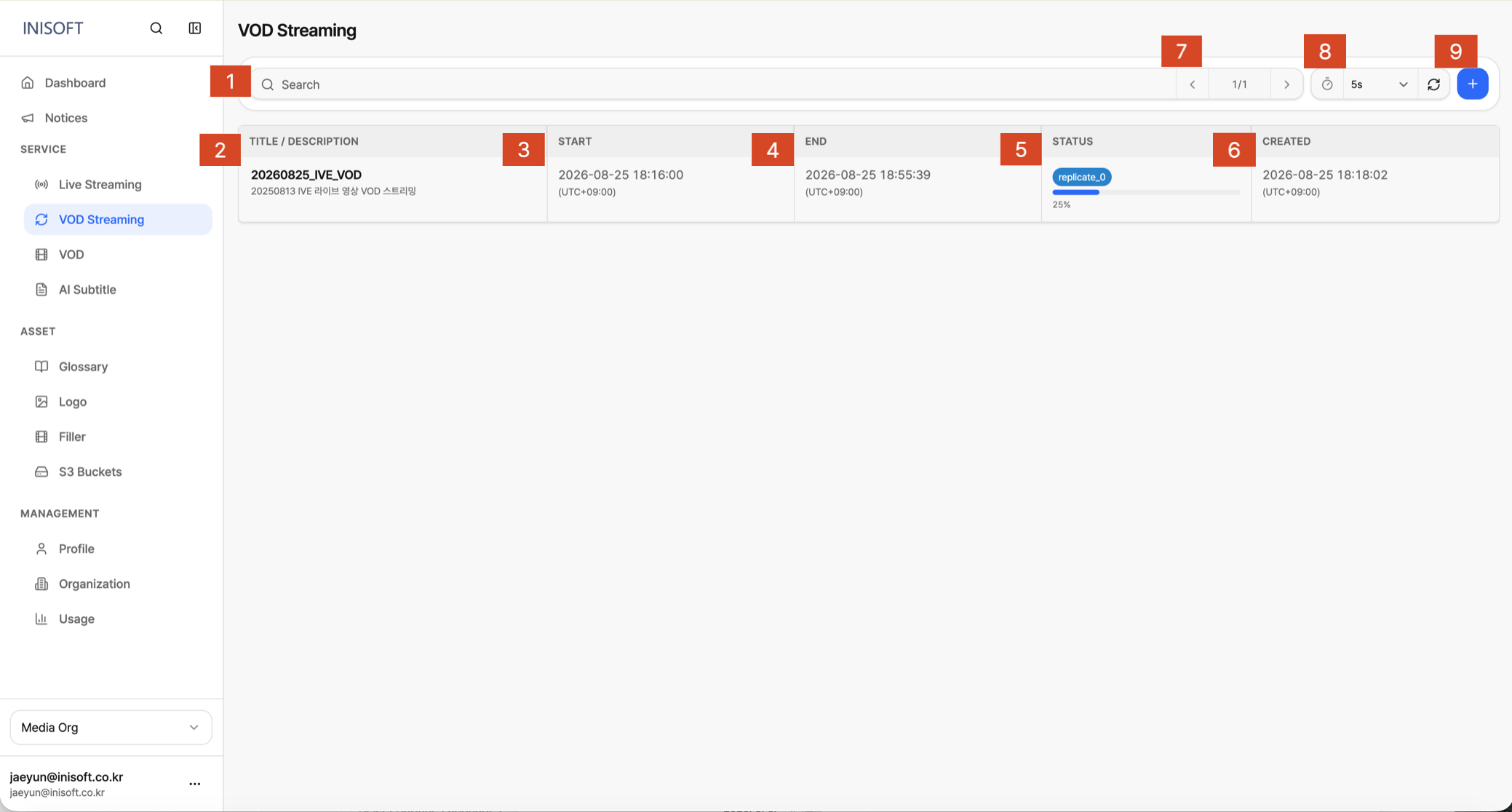
Fig. VOD Streaming list — Title/Description · Start/End · Status · CDN · Created
| No | Column | Description |
|---|---|---|
| 1 | Search | Search the list by event name or description to quickly find the event you're looking for. |
| 2 | Title / Description | Shows the name and description of the event. |
| 3 | Start | The time the event is scheduled to start. |
| 4 | End | The time the event is scheduled to end. |
| 5 | Status | The status of the event. A progress bar is shown until the event has finished being created. |
| 6 | Created | The time the event was created. |
| 7 | Page navigation | When the list spans multiple pages, click the left/right arrows to move between pages. The current page and total page count are shown together. |
| 8 | Auto refresh | Reloads the list on a set interval. You can also click the button to refresh the list immediately. |
| 9 | Create event | Creates a new event. |